Category

Technology

Games: Prison Architect, The Universim, Sid Meier’s Starships & Civilization 6

By Games, TechnologyNo Comments

I’m a really casual gamer. I play all my games on my Mac and don’t own a console. At the moment I’m super excited about the games out, in development or coming out soon. So I’m going to write about my top four favourite games which are: Prison Architect, The Universim, Sid Meier’s Starships and Civilisation 6.

1. Prison Architect

prison-architect-steam-screenshot

Prison Architect has Very Positive ratings on Steam.

In Prison Architect you build, manage and maintain a prison. The player manages every aspect of the prison including: the staff, the prisoners, the routine, the rehabilitation programmes, etc.

It originally started out as an Indie game by Introversion Software. I backed it on Steam as a pre-alpha and later had my brothers name put in the game. The great thing about this was each month, I got/get a free update with new content, bug fixes and improvements.

Since then it has has launched as version 1, being available on both PC and Mac. It has loads of positive reviews on Steam, tens of thousands of players and has just launched or about to launch on consoles. The creators have also recently won BAFTA for the game.

It’s a great game that I played over 128 hours on various prisons. Totally absorbing and addictive. I would highly recommend you go get it and play it. Below are screenshots of a prison that I’ve been building and managing for well over a year:

my-prison-1

My Prison (1), I’ve been playing this prison for well over a year and for hundreds of hours.

my-prison-2

My Prison (2), I’ve been playing this prison for well over a year and for hundreds of hours.

Here’s a trailer video for Prison Architect:

Click here to display content from YouTube.
Learn more in YouTube’s privacy policy.

Essential Info

About: A game where the player builds, manages and maintains a prison.
Platform: PC/Mac, Linux, XBOX & PS4.
UK Price: £19.99
Status: Version 1 released on PC/Mac a few months ago. XBOX version 1 released shortly after. PS4 version 1 release date is 28th June 2016.

2. The Universim

the-universim-from-presskit-01

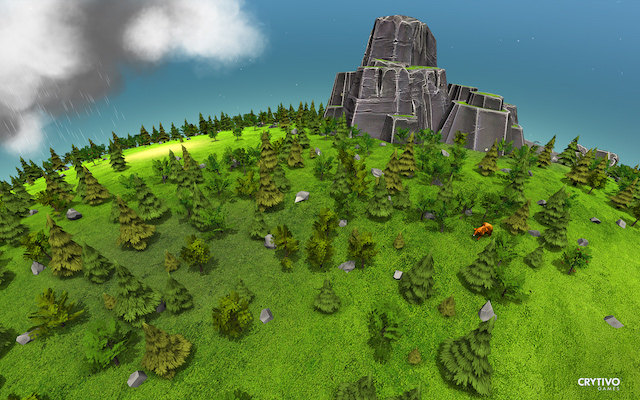
The Universim – The Planet Management God-game. Image from The Universim Press Pack, Copyright © The Universim, 2016.

The Universim is a god-game and planet management game by indie game developer Crytivo Games. It has previously received Kickstarter backing and is currently in pre-alpha. I backed it on their website, buying the DIMETRODON EDITION, which cost me $60 (US Dollars). The great thing is that they have different packages for all price ranges.

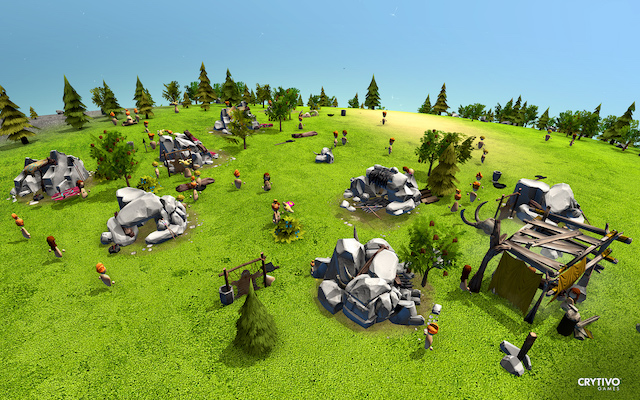
This game is visually beautiful. From the trees to the weather, to the animals, nuggets and buildings. The artwork is stunning. The game has little people, called nuggets, which the player is god over.

The Universim

is in the pre-alpha stage, meaning that it is still in development. Each month a patch is released (on 15th of each month), as well as patch notes and other updates. Other updates focus on the future game development including ideas, concepts and plans. The developers are currently getting the core game mechanics right, so at the moment there isn’t much to play. If you’re looking for a finished game, as the creator and designers say, wait to purchase until sometime in the future.

If you love backing games and giving feedback on bugs and ideas to shape the game, pre-order it today. Providing that you choose a package that has pre-alpha access, you’ll be able to download the current version and play it straight away. The game has a really cool launcher built in that checks the server for updates every time the program is opened. Giving feedback and reading the feedback of others is easy on their forums.

Here are some screenshots from The Universim and a trailer video:
the-universim-from-presskit-02

The Universim – close up of ‘nuggets’ which are like people. Image from The Universim Press Pack, Copyright © The Universim, 2016.

the-universim-from-presskit-03

The Universim – the weather thunder and lightening. Image from The Universim Press Pack, Copyright © The Universim, 2016.

the-universim-from-presskit-04

The Universim – A close up of the beautiful trees. Image from The Universim Press Pack, Copyright © The Universim, 2016.

Click here to display content from YouTube.
Learn more in YouTube’s privacy policy.

Essential Info

About: A god-game and planet management game with little people (nuggets). Features to come include: god powers, research, more buildings, nuggets moving through the ages from Stone Age to Modern Age, etc.
Platform: PC/Mac/Linux
Price: From $25-$250 (US Dollars)
Status: In the early stages of development. Pre-alpha.

3. Sid Meier’s Starships

starships-game-play-screenshot-1

Sid Meier’s Starships Gameplay Screenshot – Welcome Screen.

Okay, so this game has been out for a while, but I love it. It’s a sci-fi game where you build a fleet of ships, undertake missions and conquer the galaxy. It received mixed reviews. I like this game and keep hoping that they’ll go back an release an expansion pack with more features. It’s a good game, that could be made brilliant by adding some of these features from my Wish List:

  • Bigger maps and bigger fleet (or more than one fleet of space ships).
  • More customisation of fleet.
  • Meaningful diplomacy.
  • More missions.
  • Longer game play.

Here’s some game play screenshots and a trailer video:

starships-game-play-screenshot-2

Sid Meier’s Starships Gameplay Screenshot – Galaxy Map.

starships-game-play-screenshot-3

Sid Meier’s Starships Gameplay Screenshot – Your Bridge.

starships-game-play-screenshot-4

Sid Meier’s Starships Gameplay Screenshot – Battle Start.

starships-game-play-screenshot-5

Sid Meier’s Starships Gameplay Screenshot – About to Attack.

starships-game-play-screenshot-6

Sid Meier’s Starships Gameplay Screenshot – Attack in Action.

Click here to display content from YouTube.
Learn more in YouTube’s privacy policy.

Essential Info

About: A sci-fi game where you build a fleet of ships, undertake missions and conquer the galaxy.
Platform: PC/Mac/iOS.
Price: About £10.
Status: Has been released for sometime.

4. Civilization 6
civilization-6-screenshot-1

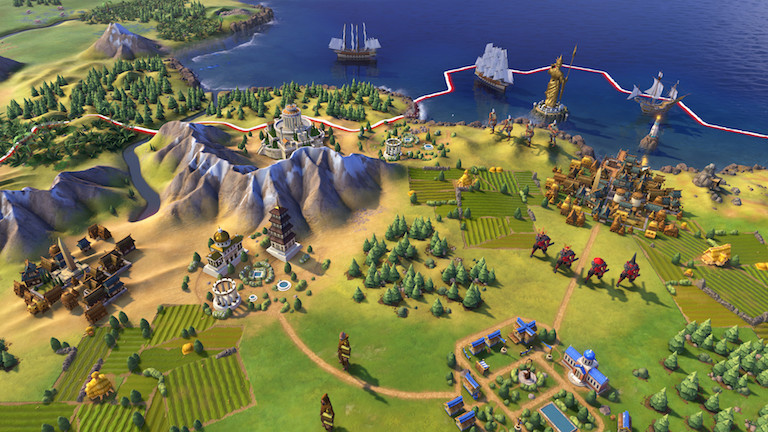
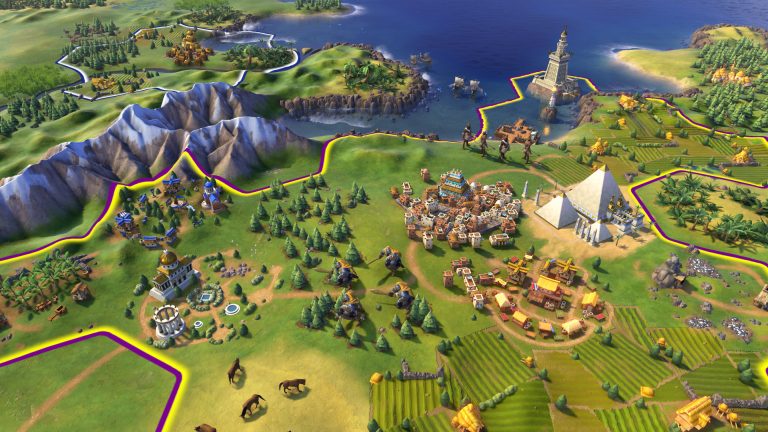
Civilization 6 Screenshot (1)

I have played the Civilization series since I was a teenager. I own every release of Civilization from Civilzation 2 all the way up to Civilization V with the Gods & Kings expansion pack. One of my favourite releases was Civilization: Call to Power because it had a future technologies meaning that you could have sea and space cities. I pre-ordered Civilization: Beyond Earth and it could have been so good, but it just wasn’t. It was completely disappointing.

Civilization 6

has been long awaited by fans. But other than these three game play screenshots, the trailer video and the game description all below, there isn’t loads of information Civilization 6 which releases on Friday 21st October 2016.

civilization-6-screenshot-2

Civilization 6 Screenshot (2)

civilization-6-screenshot-3

Civilization 6 Screenshot (3)

GAME DESCRIPTION
PLATFORM: PC
RELEASE DATE: OCTOBER 21, 2016
FEATURES

EXPANSIVE EMPIRES: See the marvels of your empire spread across the map like never before. Each city spans multiple tiles so you can custom build your cities to take full advantage of the local terrain.

ACTIVE RESEARCH: Unlock boosts that speed your civilization’s progress through history. To advance more quickly, use your units to actively explore, develop your environment, and discover new cultures.

DYNAMIC DIPLOMACY: Interactions with other civilizations change over the course of the game, from primitive first interactions where conflict is a fact of life, to late game alliances and negotiations.

COMBINED ARMS: Expanding on the “one unit per tile” design, support units can now be embedded with other units, like anti-tank support with infantry, or a warrior with settlers. Similar units can also be combined to form powerful “Corps” units.

ENHANCED MULTIPLAYER: In addition to traditional multiplayer modes, cooperate and compete with your friends in a wide variety of situations all designed to be easily completed in a single session.

A CIV FOR ALL PLAYERS: Civilization VI provides veteran players new ways to build and tune their civilization for the greatest chance of success. New tutorial systems introduce new players to the underlying concepts so they can easily get started.

From: http://franchise.civilization.com/en/games/civilization-vi/, Last accessed: Sunday 22nd May 16.

Click here to display content from YouTube.
Learn more in YouTube’s privacy policy.

There has already been a huge reaction among fans to the screenshots. Many of them dislike the artwork that they have described as ‘cartoony.’ I doubt at this late stage of the games’ development that the artwork will change. The artwork has grown on me a little. But I’m concerned that it might reflect a dumbing down of the game’s complexity, which is what has made previous versions so addictive to play.

I like the idea of unstacking cities and city districts and think that it will add to game play. I’m not keen on the DLC or the difference in price between the Standard and Deluxe editions of the game. I feel the standard edition is to expensive, never mind the cost of the deluxe edition, so I will most likely wait until a reduction in price and would advise you to do the same.

Essential Info
About: The latest strategy game from the award-winning Civilization series.
Platform: PC (Unsure if it will have Mac compatibility on launch, but no doubt a mac version will follow if not.)
Price: £49.99 standard edition, £69.99 deluxe edition.
Status: Releases on Friday 21st October 2016.

Blog soon,

Antony


I aim for posts on this blog to be informative, educational and entertaining. If you have found this post useful or enjoyable, please consider making a contribution by Paypal:


Share on Social Media:

Tech Review: The Logitech UltraThin Keyboard Cover for iPad

By Amazon, Reviews, TechnologyNo Comments
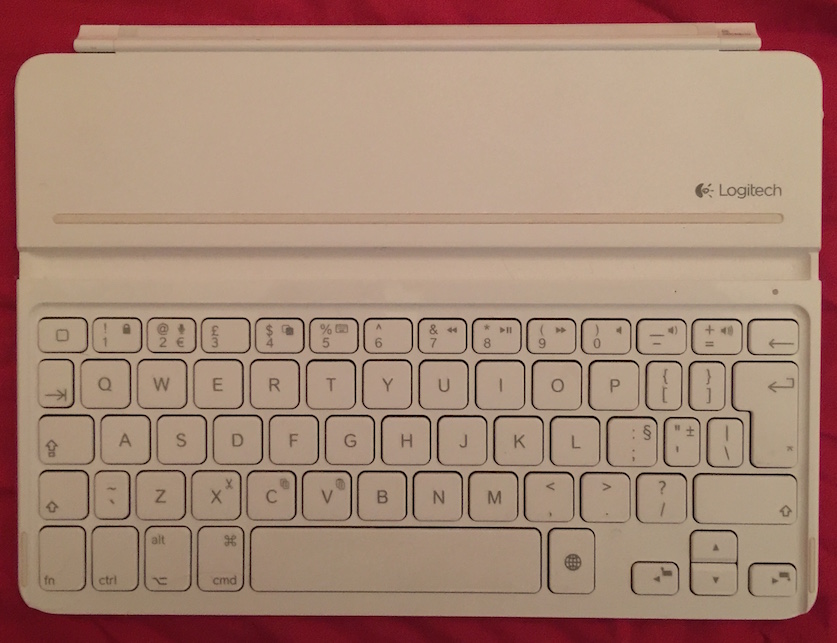
logitech-keyboard-cover-0

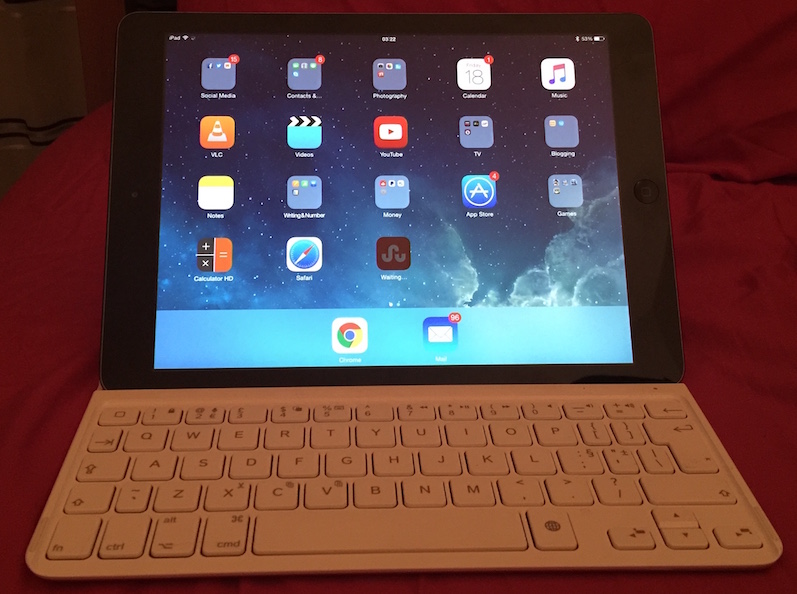
The Logitech UltraThin Keyboard Cover

An ex-boyfriend of mine bought me Logitech UltraThin Keyboard for my iPad Air. Like anything the Logitech UltraThin Keyboard has Pros and Cons.

Logitech really need to improve the battery life of this device. After just over a year of use the battery died on mine. The Logitech UltraThin Keyboard has no way to change the battery – so it just has to be chucked in the bin. Which was disappointing and is a shame because there’s lots I like about the device. Here’s a list of Pros and Cons:

Pros:

  • Easy to setup and connect to iPad via bluetooth.
  • Thin Design and white colour.
  • Doubles as a cover for iPad.
  • Easy to charge by plugging into a computer USB port.
  • The stand slot is great for positioning the iPad at the perfect angle to easily see the screen.
  • Portable meaning you can work on the go.
  • Status light: Green you are good to go, Amber (flashing) charging, Red no charge.
  • On/Off switch on the side, so that you can switch it off to save power when not in use.
Cons:

  • Price. It’s expensive for what it is.
  • Battery Life and inability to change the battery.
  • There’s a lag between you typing on the keyboard and it appearing on the screen. At times, I’ve had to wait for it to catch up.
  • Lots of additional functions on the keyboard – but no instructions enclosed on how to use them. Meaning for the average user they will be useless.


logitech-keyboard-cover-1

The Logitech UltraThin Keyboard Cover in Use.

Logitech UltraThin Keyboard is available to buy on Amazon, although after my experience, I can’t really recommend it.

Review soon,

Antony

Share on Social Media:

Health Tech Review: Contour Next USB Glucose Meter by Bayer

By Health, Reviews, TechnologyNo Comments
diabetes-BM-reader-large

Diabetes/Health Illustration Logo.
© Antony Simpson/Sye Watts.

I’m a type 1 diabetic. See my blog post How I was diagnosed with Diabetes to learn more about my diabetes story. Anyway today I’m reviewing the Contour Next USB Glucose Meter.

Sometime ago, I switched to the Contour Next USB Glucose Meter. It was one of the best diabetes-related things I’ve ever done.

The Contour Next USB Glucose Meter is small, easy to use and track trends. There’s so many good things about the Contour Next USB Glucose Meter, that I’ve put together a list of features that I like:

  • It’s small – tiny in comparison to most other Glucose Meters. Something I appreciate and that I imagine others would.
  • It’s easy to use – with it’s big colour display and three options. It’s three options being: Logbook, Trends and Setup.
  • As well as logging blood sugars it has the options to log carbs and/or insulin.
  • USB connection to the computer with java-based software that’s Windows & Mac compatible.
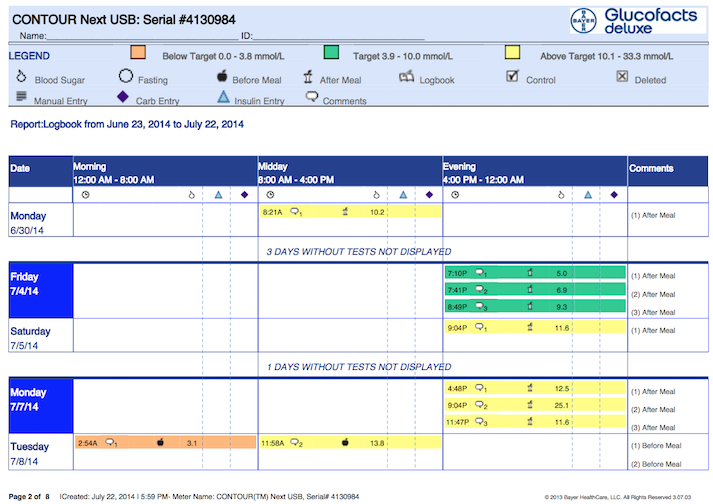
  • Software – That creates great detailed reports in PDF format that you can then share with your GP, Diabetes Nurse, Diabetes Consultant, etc.
  • Both the device and software track trends – the software reports giving much more details on trends.
  • USB charges meter battery – not that in the plus 6 months I’ve had it I’ve needed to charge it.
  • Meter allows you to fill the same strip with extra blood if you didn’t put enough blood in the first time. Rather than starting again.
  • No coding or quality testing required.
  • Finger-pricking device is small.
  • Comes with a slightly bulkier case that keeps everything together – the meter, the testing strips and the finger-pricking device.

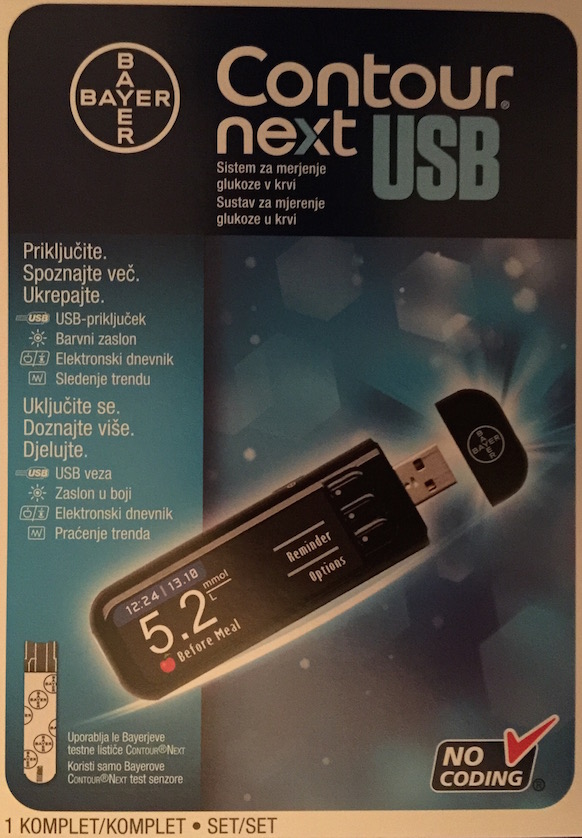
Here are some images of the Contour Next USB Glucose Meter:

next-contour-USB-box

Contour Next USB Box

contour-next-USB-glucose-meter

What The Meter Looks Like

PDF-report-screenshot-contour-next-USB-glucose-meter

Sample of PDF Report that the software creates.

The only thing I dislike is that the java-based software can be slow and occasionally crashes. But the benefits the software brings far outweigh these slight annoyances.

Overall the Contour Next USB Glucose Meter is by far the best glucose meter I’ve used. It’s probably the best on the market. An improvement on future models could include connection/communication with Apps that could be used on the iPhone or iPad.

You can Request a FREE Contour Next USB Glucose Meter or Find Out More about the Contour Next USB Glucose Meter here.

Review soon,

Antony


I aim for posts on this blog to be informative, educational and entertaining. If you have found this post useful or enjoyable, please consider making a contribution by Paypal:


Share on Social Media:

Adios Vodafone – After A Nightmare Trying To Upgrade, Hello Giffgaff

By Life, Money / Finances, Shopping, Technology, ThinkingNo Comments

Recently my old iPhone 5 battery started dropping it’s charge. So as a loyal long term Vodafone customer, one that had been with them for years, I decided to speak to them about an early upgrade. They said I could and I opted for Apple’s iPhone 6 Plus (64GB, GOLD) as a new handset, which they said would be delivered the next day.

After three weeks of telephoning Vodafone customer services practically on a daily basis and receiving many broken promises, I still had no new handset. I felt frustrated, that the order was no further forward and like anything that they said to me on the phone would be a lie. Despite how I felt, I always remained pleasant and patient. But I decided to cancel my telephone upgrade order and re-order the upgrade in store.

My local store had Apple iPhone 6 Plus (64GB, GOLD) in stock. Hurray! But wait, I couldn’t have it because of their IT systems still showing the original upgrade order as open – despite me cancelling it and reassurances from Vodafone customer services on the phone that I would be able order in store. I tweeted my frustration to them, not that the staff in store, on the telephone or on twitter seemed to care.

I’d lost my trust in them. A search online revealed that I wasn’t the only one experiencing issues upgrading. Vodafone’s problems seem to be:

  • Their IT systems. An order gets canceled because they don’t have the handset in stock, but the order still shows as open and gets stuck.
  • The warehouse stock levels, warehouse management (in terms of ordering more handsets before they run out) and distribution.
  • No complaints department or way to escalate order issues to get them sorted.

Up until this experience, Vodafone have always been good with me. But this experience felt like a bad joke. I decided to show them what I thought of this experience by walking away and taking my wallet with me.


Get a free giffgaff Sim

giffgaff-logo A friend on Facebook recommended that I sign up with GiffGaff. I did and everything went smoothly. The handset was delivered the next working day as promised. It’s been a brilliant, easy and enjoyable service so far.

Here are some advantages of being with GiffGaff and how they are different to other providers:

  • They do sim only deals or handset and sim deals.
  • You buy the handset as a credit agreement. Meaning you can pay a small or larger deposit, choose the term of the credit agreement and it’s all really clear and easy to understand.
  • All handsets come unlocked, so can be used on any network.
  • You buy monthly goodbag packages, rather than having a fixed term contract.
  • You can leave GiffGaff at any time by turning off the auto-renew goodybag and getting a sim card for another network.
  • They’re competitively priced – cheaper than most other companies from the prices that I’ve seen.
  • Free GiffGaff to GiffGaff calls.
  • They regularly listen to customers and take their ideas on board.
  • And much more…

So if you’re looking to switch mobile phone providers, I’d highly recommend GiffGaff.

Blog soon,

Antony


Get a free giffgaff Sim

Share on Social Media:
×