Category

Technology

My Handwriting As A Computer Font

By Technology, The Web2 Comments

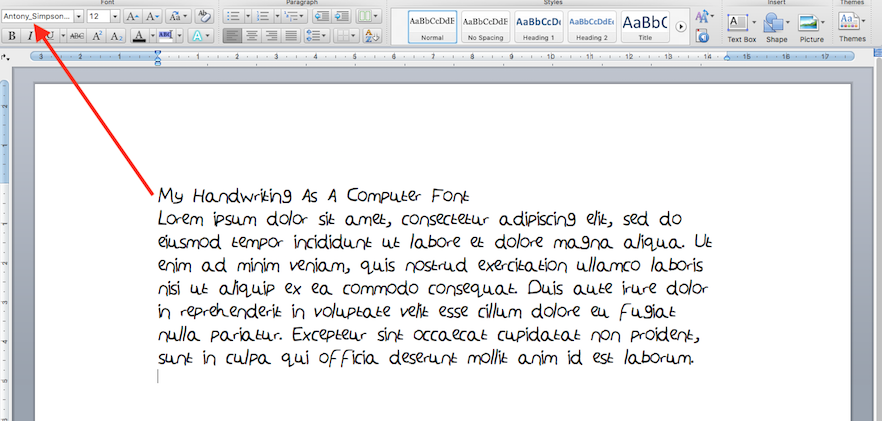
A while back I discovered how to turn my handwriting into a computer font. Here were the results:

my-handwriting-as-a-computer-font

Here’s my handwriting as a computer font. Click anywhere on the image for a larger image.

So how did I do it?

Well it was easy. I used a website called MyScriptFont, which has since been discontinued and replaced by a paid service.

However I’ve found YourFonts which works for free. Simply go to their website and follow the 7 easy steps. Then you’ll have your handwriting as a computer font.

Blog soon,

Antony

mental-health-wisdom-banner


I aim for posts on this blog to be informative, educational and entertaining. If you have found this post useful or enjoyable, please consider making a contribution by Paypal:


Share on Social Media:

Did You Know? (Part 6 – Technology)

By Technology, The WebNo Comments
did-you-know

Did You Know?

This is the sixth and final in a series of Did You Know? blog posts. Each blog post gives fascinating facts on a particular topic. In part 1 the topic was science. In part 2 the topic was history. In part 3 the topic was geography. In part 4 the topics were art & music. In part 5 the topic was animals.

Today, I give you ten facts about Technology:

1. The first mobile phone call was made by Martin Cooper in 1973.

2. The first iPhone was released in the UK in 2007. Today there are more than 682m iPhones in the world.

3. Alan Turing is most well-known for being an excellent code-breaker in World War 2. He happened to be gay and was castrated by the UK state for his sexuality. But he also proposed founding theories about how to make computers work and computer science.

4. The World Wide Web (WWW) was invented by Sir Tim Berners-Lee in 1989. Today £1.7trillion is spent online in a year, 3m emails are sent every second (mostly SPAM) and there is countless amounts of data on the internet.

5. The X-ray was invented by Wilhelm Conrad Röntgen in 1895. The idea for the CT (Computed Tomography) scanner was first imagined by Godfrey Hounsfield in 1969. Hounsfield presented his idea to Dr. James Ambrose and they worked together to make his idea a reality. The MRI (magnetic resonance imaging) scanner was developed by a number of people. The X-ray, CT scanner and MRI scanner have all revolutionised medicine, by allowing doctors insight to what it going on in a patient’s body, without the need for invasive surgery.

6. Google deals with 1 billion searches a day.

7. Someone using a computer will blink 7 times a minute, rather than the normal 20 times a minute. This is because they are concentrating more on the screen.

8. Technology of Sci-Fi TV shows and films is now becoming a reality. For example, in Star Trek computers respond to verbal commands and its responses were relatively intelligent. Today we have Siri (Apple), Alexa (Amazon), Contina (Windows) and Android Voice Commands (Google/Android).

9. The operating system Linux is huge across servers, computers, tablets and smartphones. The chances are you use it without even realising. Linux is on every Android device, along with being on most serves (computers that host websites) in the world. Facebook, Google and Pinterest all run on Linux servers.

10. The people at Wired.com were the first to come up with banner advertisements, which are now used on most commercial websites.

Write soon,

Antony

References
Know Your Mobile – The History of Mobile Phones From 1973 To 2008: The Handsets That Made It ALL Happen
BBC News – Apple iPhone debuts in UK stores
{Life} Buzz – 25 Things You Didn’t Know About Technology… Almost No One Knows About #7.
Alan Turing: The Enigma
The Daily Beast – The Castration of Alan Turing, Britain’s Code-Breaking WWII Hero
Computer Hope – When was the first computer invented?
World Wide Web Foundation – History of the Web
Sunday Express – Top ten facts about…the internet
How Stuff Works – Science – Who invented the X-ray?
Eureka – When Hounsfield Met Ambrose, The Invention of Computed Tomography
Thought Co. – Magnetic Resonance Imaging MRI
Did you know? Technology fast facts
Techlila – 32 Computer Facts and Interesting Facts About Technology
The Guardian – Technology – Voice Recognition
WIRED – Linux Took Over The Web. Now, It’s Taking Over The World

mental-health-wisdom-banner


I aim for posts on this blog to be informative, educational and entertaining. If you have found this post useful or enjoyable, please consider making a contribution by Paypal:


Share on Social Media:

Hosting Switch: Transferring my WordPress Blog to 1&1 from Vidahost

By Technology, The WebNo Comments

My blog has been hosted on Vidahost for a number of years. But they recently emailed to inform me a price hike. So I decided to switch to another hosting provider, this blog post is about the process of transferring my WordPress blog from one server to another.

I should add that it wasn’t just the price hike that caused me to make this decision. Customer support is much poorer now than it has been in the past. For example: I got an email stating I was running out of disk space. I opened a ticket to see if I could increase disk space without upgrading package. The Customer Agent basically said no.

Then when I was transferring my files from Vidahost’s (old) server to 1&1’s (new) server (more details below) I noticed huge error logs (2.5GB one of them) and many .core files (100-200MB each). These files had eaten up my disk space (from the usual 2GB of 10GB used). At one time a Vidahost’s Customer Agent would have looked at my files on the server to see why I had run out of space all of a sudden, spotted the problem and resolved it.

1and1-hosting-screenshot

I recently switched hosting provider to 1&1’s.

I asked my friends on Facebook if they could recommend a good, UK-based Hosting provider. One of my friend’s husband recommended 1&1’s.

I decided to transfer my hosting as 1&1 offered a better price, unlimited bandwidth (which I was always in the red on Vidahost), unlimited disk space and more up-to-date servers (I’d recently had a few problems updating WordPress plugins on Vidahost servers due to PHP version).

But the prospect of moving my WordPress blog from one server to another was daunting. How the hell do I do that? I thought to myself. So I Googled it and found this great Step by Step Guide by WPExplorer.

There were a few hiccups. I successfully exported my WordPress database, but when I went to import it on the new server it timed out. I checked the database on the new server and found it was missing the last few fields. So I googled and found this site Exporting Your Database from Your Previous Host by WPEngine, which explains how to export specific fields. I exported the missing fields and then imported them. First problem solved.

Then I downloaded my files from the old server and uploaded them to the new server using ForkLift by Binarynights without any problems. I changed my wp-config.php and uploaded it. My second problem was an Error Establishing Database Connection. I googled the error and found How to Fix Error Establishing Database Connection by wpbeginner. This site helped me realise what I hadn’t updated in the wp-config.php.

My final step was to change the NameServers for my domain. I did this and my blog and emails went down for about 24 hours while NameSever propagation took place.

Once my blog and emails were back up, my final problem was that my blog wasn’t displaying right. Nothing I did fixed the problem. In the end I opened both the old server and new server’s File Explorers in Google Chrome.

It was then spotted the problem, all folders and files had different file permissions on the new server. So I changed them to match the settings on my current server, which solved the problem. Here is an article that explains more about file permissions: Ask Unbuntu – What is meaning of 755 permissions.

Another website I found extremely helpful in this transfer process was: WordPress Migration Problems and How to Fix Them by Nelio.

So there we have it. Job done.

Blog soon,

Antony

mental-health-wisdom-banner


I aim for posts on this blog to be informative, educational and entertaining. If you have found this post useful or enjoyable, please consider making a contribution by Paypal:


Share on Social Media:

Health Tech Review: Daylight Lamp by Beurer

By Amazon, Health, Reviews, TechnologyNo Comments
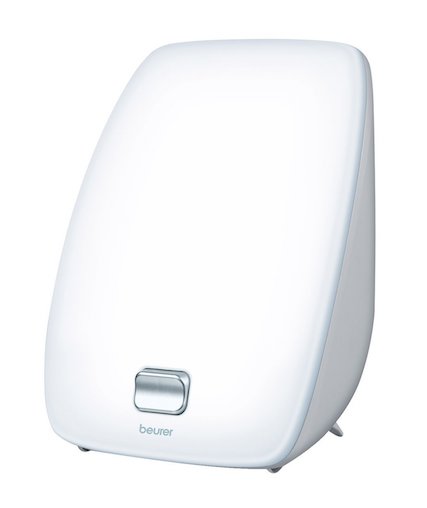
Daylight-Lamp-Beurer I had been thinking about getting a Seasonal affective Disorder (SAD) lamp for a while. Everyone I spoke to about it had friends that swore by theirs, but nobody that I knew actually had one.

So this Autumn, as evenings started to get darker earlier and there was less light in the mornings I treated myself to a Daylight Lamp by Beurer.

I have popped the daylight lamp on my desk and have used it daily, usually in the evenings after work throughout November & December.So what are my thoughts?

They are mixed. The dark mornings haven’t seemed to affect my mood as bad, but this could be the placebo effect.

Despite the Daylight Lamp box boasting that the lamp is medically certified it doesn’t reference any specific research studies to back this claim up, let alone some good longitudinal research studies.

Here are my Pros and Cons for the Daylight Lamp by Beurer:

Pros Cons
  • It appears to work. Getting up in the dark mornings hasn’t felt as difficult as in previous years. Nor has my mood seemingly been affected as much as normal by the lack of light. This could be the placebo effect, but does it really matter? As long as it works.
  • It is easy to setup and work. Simply position it, plug it in and use the one simple on/off switch on the front.
  • It is super-bright. I have nicknamed it my God Light.
  • It has a stand, so sits on my desk easily.
  • It is thin, meaning that it doesn’t take up much space.
  • It is plastic, meaning that it is easy to dust/clean.
  • It is lightweight meaning that it is easy to move. You could take it to work or other places with you.
  • The lamp made no difference to my blood sugars, which is a good thing as a type 1 diabetic.
  • It was expensive, when compared with other non-SAD lamps, costing nearly £50.
  • Replacement bulbs can only be bought from the manufacturer and not in any high street shops. I haven’t tried looking online, it’s possible that I’ll be able to get bulbs online. Hopefully they are not to expensive.
  • Switching on/off the lamp requires you to hold the back, as the product is so lightweight that trying to press the switch without holding the back results in it moving.
  • The front of the lamp does get warm/hot to the touch once it has been on a while. The manufacturer does recognise this and warms customers about it in the instructions.

Overall the Daylight Lamp by Beurer has more Pros than Cons and can be bought on Amazon.

Review soon,

Antony


I aim for posts on this blog to be informative, educational and entertaining. If you have found this post useful or enjoyable, please consider making a contribution by Paypal:


Share on Social Media:
×